Many gamers in the United States often wonder, "will RAM increase FPS?" This common question delves into the intricate relationship between Random Access Memory and game performance. Understanding how RAM functions within your PC setup is crucial for optimizing your gaming experience. While upgrading RAM can sometimes lead to noticeable improvements in frame rates per second, it's not always the magic bullet. Your CPU and GPU play significantly larger roles in determining overall FPS. However, insufficient or slow RAM can certainly act as a bottleneck, hindering your system's ability to process game data quickly. This guide explores the real impact of RAM on FPS, helping you make informed decisions about your gaming rig. We'll navigate through technical details, offering practical advice for everyday gamers seeking smoother gameplay and faster load times. Let's explore whether investing in more or faster RAM is the right move for your gaming goals.
When we talk about gaming performance, specifically frames per second or FPS, many people ask, "Will RAM increase FPS?" This is a really common question for PC gamers, especially when chasing those smooth, high-frame-rate experiences. In simple terms, RAM is your system's short-term memory, holding data the CPU needs to access quickly. This includes game assets, operating system processes, and other applications running in the background. Understanding its role helps us see how RAM impacts your gaming.
So, what exactly happens when you have insufficient RAM for gaming? If your system doesn't have enough RAM to store all the necessary game data, it starts relying on your hard drive or SSD. This process, known as 'paging' or 'swapping,' is significantly slower than accessing RAM. When this happens, your gaming experience suffers. You might encounter **stuttering, longer loading screens, and inconsistent frame rates**. Therefore, having enough RAM is essential for preventing these frustrating performance hitches.
It's important to clarify that while sufficient RAM is crucial for stable FPS, simply adding more RAM won't magically double your frame rates. The **Graphics Processing Unit (GPU)** is the primary component responsible for rendering game graphics and generating frames. The **Central Processing Unit (CPU)** handles game logic, physics, and instructs the GPU. RAM acts as a quick buffer between these powerful components. Your RAM helps feed data to the CPU and GPU efficiently, but it isn't directly generating the frames itself.
The Direct Impact of RAM on FPS for Gaming Performance
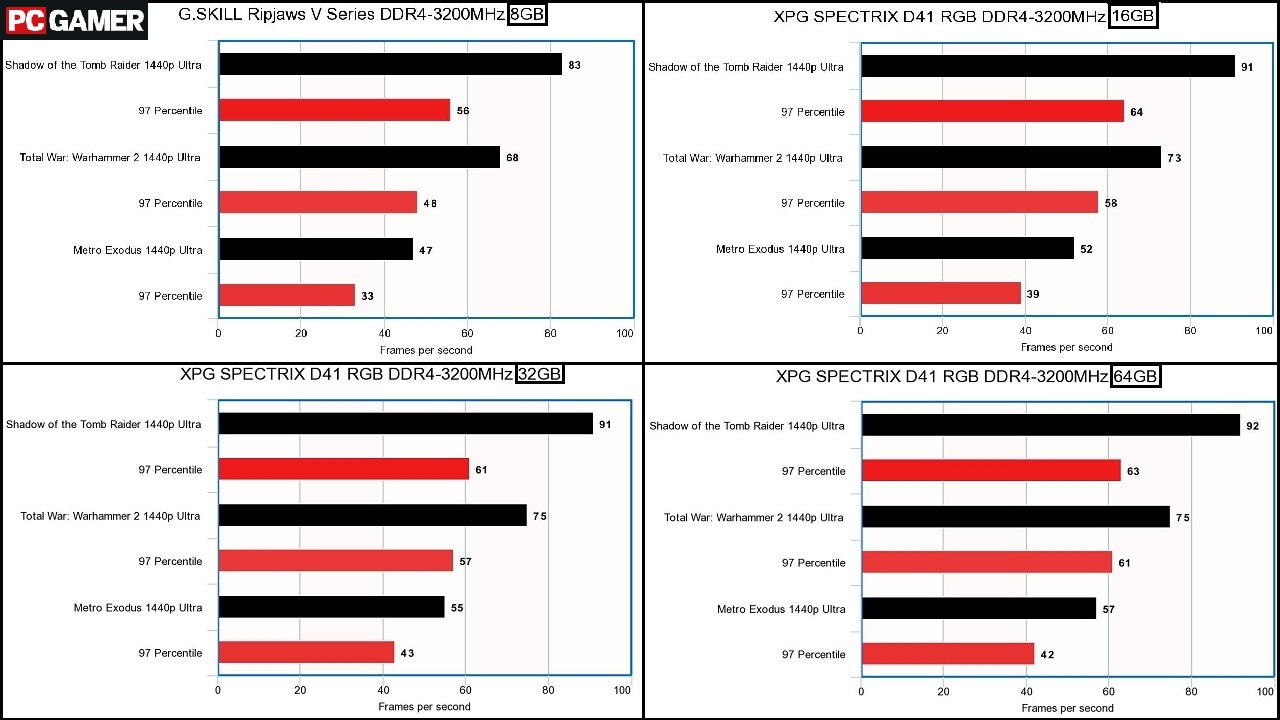
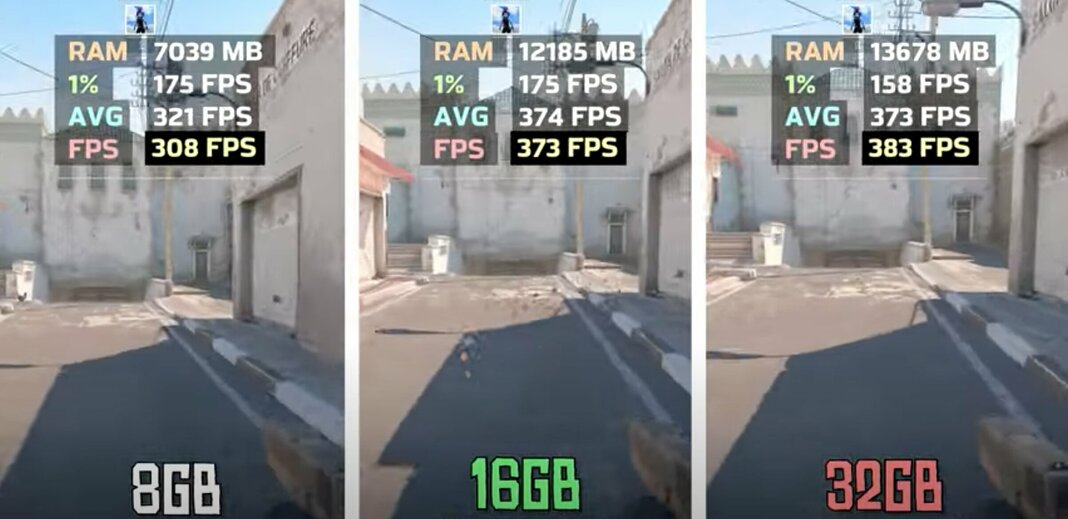
So, will RAM increase FPS significantly? Generally, the biggest jump in FPS from RAM happens when you move from an insufficient amount (like 4GB or 8GB) to a more adequate quantity (like 16GB). Most modern games recommend at least 16GB of RAM. If you are struggling with stuttering and your RAM usage is consistently maxed out, then upgrading will certainly help smooth things out. However, if you already have 16GB or 32GB, adding even more RAM is unlikely to provide a substantial FPS boost in most titles.
RAM Speed and Timings: Does Faster RAM Increase FPS?
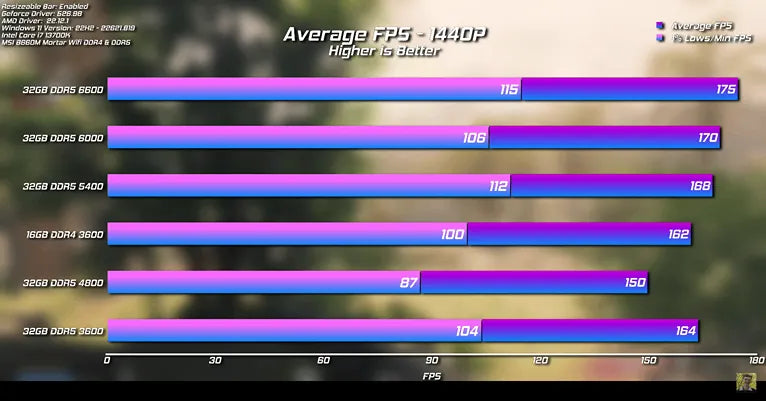
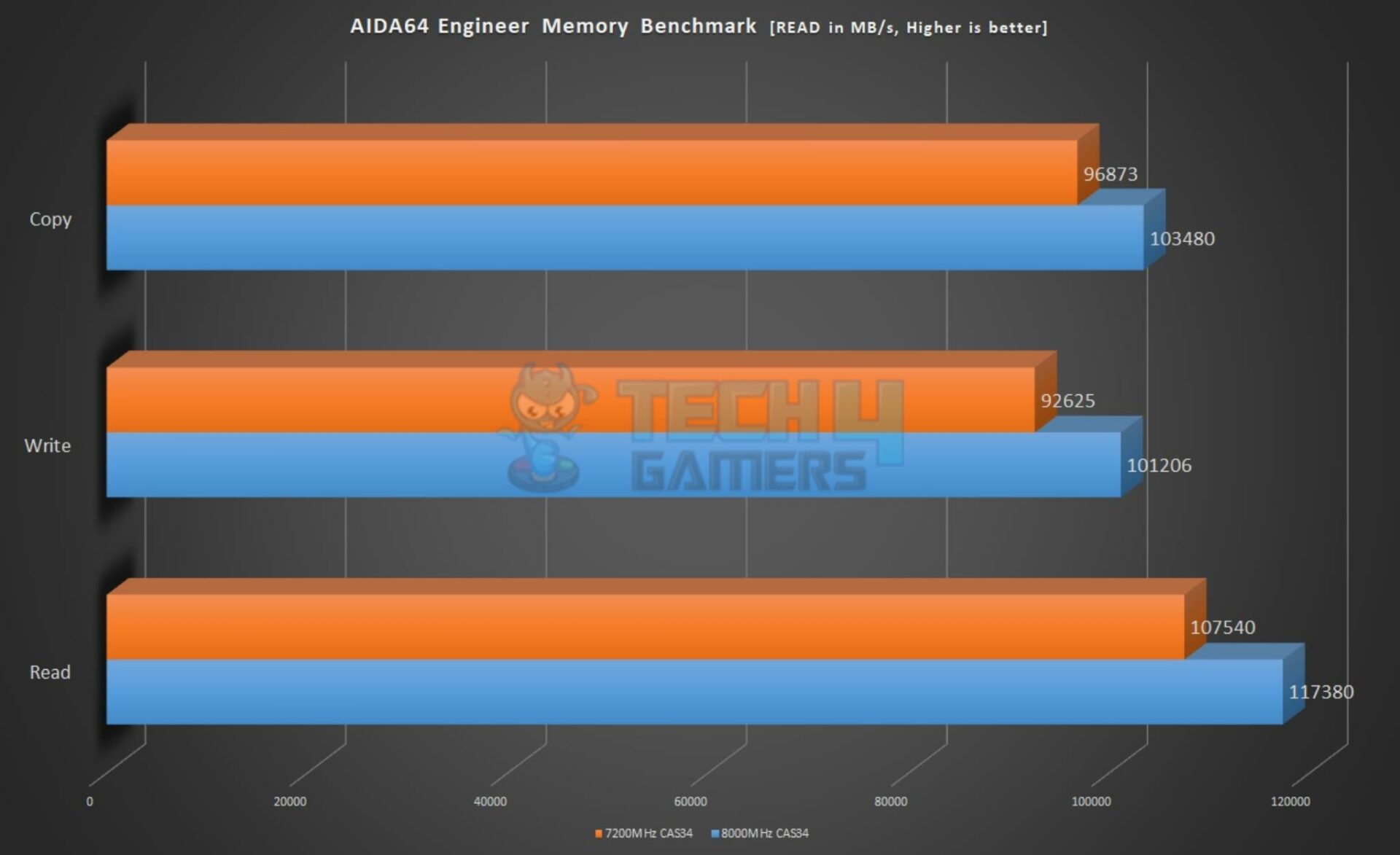
Beyond just quantity, the speed and timings of your RAM also play a role in gaming performance. Faster RAM, measured in MHz, allows the CPU to access data more quickly. Similarly, lower latency (CAS Latency or CL) means the RAM responds faster. While these factors might not always translate to huge FPS gains, they can offer a noticeable improvement, especially in CPU-intensive games or those with demanding open worlds. **Upgrading to faster RAM** can help your CPU process instructions more efficiently, reducing potential bottlenecks.
Understanding Dual Channel RAM and Its FPS Benefits
Another critical aspect often overlooked is configuring your RAM in dual channel mode. Most modern motherboards support dual channel memory. This setup allows your CPU to communicate with two RAM sticks simultaneously, effectively doubling the memory bandwidth. Running two sticks (e.g., 2x8GB instead of 1x16GB) in the correct slots can provide a **significant and measurable increase in FPS**, particularly in games that are sensitive to memory bandwidth. Always check your motherboard manual for the correct slot configuration for dual channel operation.
What Others Are Asking? Will RAM Increase FPS FAQs
Will 16GB RAM increase FPS?
Moving from 8GB to 16GB of RAM often provides a noticeable increase in gaming FPS, especially if your current games cause stuttering. Most modern titles now consider 16GB the standard for smooth performance. However, if you already have 16GB, upgrading further may offer diminishing returns for FPS alone.
Does RAM speed affect gaming FPS?
Yes, RAM speed can affect gaming FPS, particularly in CPU-intensive games or scenarios where the CPU is bottlenecked. Faster RAM (higher MHz) allows the CPU to access data more quickly, potentially leading to smoother frame rates and improved minimum FPS. The impact varies greatly by game and system configuration.
How much RAM do I need for gaming in 2026?
For most gaming in 2026, 16GB of RAM is still a solid baseline, offering smooth performance in a wide range of titles. However, if you're playing the latest AAA games, streaming, or running many background applications, 32GB of RAM provides a more future-proof and comfortable experience.
Can RAM bottleneck my GPU for FPS?
Absolutely, RAM can bottleneck your GPU, especially if you have insufficient RAM capacity or very slow RAM. If your system constantly has to offload data to slower storage because RAM is full, your GPU will sit idle waiting for data, leading to lower FPS. Dual channel configuration is also key.
Is 32GB RAM overkill for gaming FPS?
For pure gaming FPS, 32GB of RAM is generally not overkill. While 16GB is usually sufficient for most titles, 32GB ensures you have ample headroom for future games, background applications, streaming, and content creation without any memory-related bottlenecks. It guarantees a consistently smooth experience.
Table: RAM Configuration and Expected Gaming Impact
| RAM Quantity | Speed/Configuration | Typical FPS Impact | Other Benefits |
| 8GB (Single Channel) | Slow | Potential stuttering, low minimum FPS | Basic system function |
| 8GB (Dual Channel) | Moderate | Improved stability over single channel 8GB | Better multitasking |
| 16GB (Single Channel) | Moderate | Often not enough for modern games | Smoother general use |
| 16GB (Dual Channel) | Moderate to Fast | Good for most modern games, stable FPS | Solid multitasking, faster loading |
| 32GB (Dual Channel) | Fast | Excellent for all games, future-proof | Heavy multitasking, content creation, streaming |
| 64GB+ | Very Fast | Minimal further FPS gain for gaming | Professional workloads, virtual machines |
As you can see from the table, there's a sweet spot for RAM when it comes to gaming. Simply throwing more money at RAM beyond 32GB usually won't give you a significant FPS increase. Instead, focus on ensuring you have enough capacity, optimal speed, and are running in a dual channel configuration to get the most out of your system.
What Role Does RAM Play in Gaming Beyond FPS?
Beyond just raw FPS numbers, RAM significantly impacts the overall responsiveness of your gaming system. It directly affects game loading times, how quickly textures stream into the game world, and the smoothness of transitions. Having adequate RAM also prevents your system from becoming sluggish when you have multiple applications open alongside your game. Imagine switching between your game and a web browser or Discord without any hitches – that's a direct benefit of sufficient RAM. A well-configured RAM setup truly enhances your entire PC experience.
FAQ: Will RAM Increase FPS? Your Quick Questions Answered
What is RAM and how does it affect FPS?
RAM, or Random Access Memory, stores data for your CPU and GPU to access quickly. It directly affects FPS by ensuring game assets and processes are readily available. Insufficient RAM can cause stuttering, as the system relies on slower storage.
Why should I care about RAM speed for gaming?
Faster RAM speed (MHz) allows your CPU to process game data more efficiently, which can lead to improved minimum FPS and overall smoother gameplay, especially in CPU-bound titles. It reduces potential bottlenecks, making your system more responsive.
How does dual channel RAM improve FPS?
Dual channel RAM doubles the memory bandwidth available to your CPU by allowing simultaneous access to two RAM modules. This significantly increases data transfer rates, leading to noticeable FPS gains and system responsiveness in many games compared to single channel setups.
When is upgrading RAM a good idea for FPS?
Upgrading RAM is a good idea if you currently have 8GB or less and experience frequent stuttering or long loading times in modern games. Moving to 16GB or 32GB, especially with faster speeds and dual channel, will significantly enhance your gaming experience.
Ultimately, a balanced system is key to maximizing your FPS. While RAM is vital, it works in conjunction with your CPU and GPU to deliver the best gaming performance. Make sure your RAM complements your other components for a truly immersive and smooth gaming experience. Don't let your RAM hold back your powerful CPU and GPU!
RAM's direct impact on FPS is limited compared to GPU/CPU. Faster RAM and sufficient capacity (16GB-32GB) reduce bottlenecks. Dual channel memory configurations significantly improve performance. RAM primarily affects loading times and system stability. Upgrading RAM is beneficial when current RAM is a clear bottleneck. Optimal RAM ensures smooth multitasking and background processes.
Optimal RAM For Gaming How Much Do You Really Need AVG FPS 3.webpHow To Increase FPS Tips And Tricks For 2026 UK How To Increase FPS - Tips And Tricks For 2024 WP Img 1024x1024 How To Optimize RAM For Gaming In 2021 FPS Boost Boost How To Optimize RAM For Gaming In 2021
Is 32GB RAM Overkill For Gaming In 2023 In Short No Image 40 Will RAM Affect Gaming Performance And FPS Will RAM Affect Performance Blog Feature Image Facebook Text RAM Preise 2026 Die Umfassende Ram Preise 2026 Will RAM Affect Gaming Performance And FPS Will RAM Affect Performance UK Blog Feature Image Bottom Text Blog TextTwitter 1536x864
Everything You Need To Know Before Buying A New 2026 Ram 1500 Near 2026RAM1500 Exterior 01 Best Ram For Highest FPS In Games R ASUSROG Micron Says No Relief For Memory In 2026 PC RAM Prices To Rise RAM Prices 1280x646 Does RAM Matter For Gaming PC Gamer
Will 16gb RAM Improve FPS YouTube Does Ram Increase Fps A Guide To The Does Ram Increase Fps 1 768x512 Virtually Refreshed 2025 Or 2026 Ram 1500 TRX Flaunts 800 HP In Plug Virtually Refreshed 2025 Or 2026 Ram 1500 Trx Flaunts 800 Hp In Plug In Hybrid Form 8 2026 RAM Revealed Unveiling Secrets Of The Future YouTube
Does RAM Affect FPS Boost Game Speed Instantly 2026 Does RAM Affect FPS.webpDoes Upgrading RAM Improve Gameplay FPS IMPROVEMENT League Of Hqdefault 2026 Ram 1500 Express Returns With Aggressive Features 5th Gen Rams 2026 Ram 1500 Black Express Front Scaled What Are The 2026 Ram 1500 Trim Levels Bedford Chrysler Dodge Jeep Ram Resized
Increase VIDEO RAM GRAPHICS Without Any Software BOOST FPS INCREASE Does RAM Increase FPS Explained Tech4Gamers HOW TO 14 Gaming RAM Guide 2026 How Much RAM For Gaming 16GB Vs 32GB Upgrade Scaled Why 32GB RAM Is The New Standard For Gaming In 2024 Tech4Gamers 8 GB RAM Vs. 16 GB RAM Vs. 32 GB RAM 1068x519
Should You Buy DDR4 RAM In 2023 V Color Manta XPrism RGB 32GB DDR5 7200MHz CAS 34 AIDA64 Memory Benchmark Result 1920x1173 Can RAM Affect FPS Beginner S Guide 2024 Ram Fps Difference RAM For FPS Does More Mean Smoother Gaming Does RAM Affects FPS How To Increase FPS Tips And Tricks For 2026 UK How To Increase FPS - Tips And Tricks For 2024 Twitter IMG
Will Upgrading RAM Increase Gaming Performance Does Ram Speedclock Affect Gaming Performance How To Optimize Ram For Gaming How To Increase Ram For Gaming Boost Will 16GB RAM Improve FPS YouTube Ram How To Optimize Memory For Gaming IN WINDOWS 10 FPS Boost %25289%2529
2026 Ram HD Review Pricing And Specs 2026 Ram 1500 Ramcharger 1 Front Three Quarter Is Adding RAM Increase FPS TechDIY Info Is Adding Ram Increase Fps Ram Launches Build Price Tool For 2026 Ram 1500 Image 126 2048x1152 Does More RAM Help Increase FPS Hone Blog Does More RAM Help Increase FPS